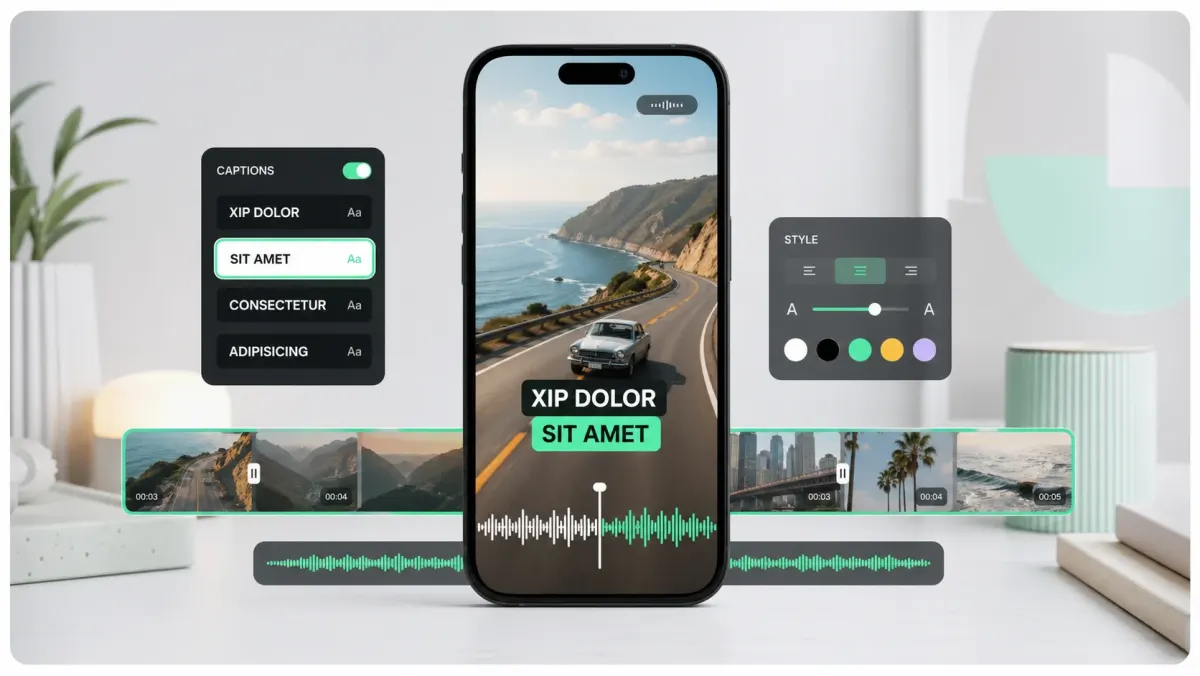
To make text pop out in a video, start with readability before style: use a bold font, high contrast, a stroke or background plate, short line breaks, and placement inside the safe zone. Then add one controlled emphasis layer, such as a karaoke highlight, scale-in animation, or keyword color. If the viewer has to work to read the sentence, the design is not popping; it is competing with the video.
This matters most on TikTok, Reels, Shorts, X, and LinkedIn because the viewer is usually on a phone, often with sound off, and rarely giving you a second chance. On a desktop monitor, thin white text over a bright background may look acceptable. On a phone outside, it disappears. The goal is not to make the text decorative. The goal is to make the spoken idea impossible to miss.
The pop-out formula
- 01Create separation: add a 2-6px dark stroke, a soft shadow, or a semi-transparent black box behind the text.
- 02Use weight before color: a 700-900 weight font usually beats a louder color on mobile.
- 03Keep each caption to one idea: one or two lines, 28-42 characters per line, and no dense sentence blocks.
- 04Animate for attention, not decoration: use a fast scale, fade, or word highlight tied to speech timing.
- 05Place captions where the eye already goes: lower-middle for talking heads, center-lower for demonstrations, and never under platform buttons.
Most weak caption designs fail at the first step. Creators try a neon font, a bouncing animation, or a trendy template, but the text still sits directly on a busy shirt, white wall, sky, product label, or moving background. The fix is simple: create a controlled local background for the text. A stroke, shadow, or plate gives every letter its own contrast regardless of what is behind it.
Use SoCaptions presets as the starting point
In SoCaptions, the fastest workflow is to upload the video, generate captions, pick a preset, and only then tune details. Start with Bold Outline when the footage changes backgrounds often, Box when the speaker is on camera and you want clean readability, Karaoke when every word matters, and Cinematic when the video is slower, darker, or more editorial.
- Bold Outline: best default for TikTok, Reels, Shorts, interviews, street footage, and bright backgrounds.
- Box: best for tutorials, webinars, podcasts, software walkthroughs, and educational clips.
- Karaoke: best for hooks, strong opinions, fast speech, and clips where retention matters more than subtlety.
- Cinematic: best for travel, food, fashion, real estate, fitness b-roll, and story-led edits.
If you cannot decide, use Bold Outline. It is rarely the most unique option, but it survives the widest range of footage and is the least likely to fail on a phone screen.
Contrast: the non-negotiable part
Contrast is what makes text visible before the viewer consciously reads it. White text on a black stroke works because every letter has both a light and dark boundary. Yellow text can work, but only if it has a dark edge. Mint, blue, pink, and purple can work as emphasis colors, but they should not carry the whole sentence unless the background is controlled.
A common mistake is designing captions on the best frame of the video. Instead, scrub to the worst frame: the brightest sky, the busiest street, the white shirt, the product close-up, the motion blur. If the caption reads there, it will read everywhere. If it fails there, no amount of animation will save it.
Line breaks make text feel designed
Caption text pops more when the line breaks match the rhythm of speech. Break after a complete phrase, not after a random word. Avoid leaving one short orphan word on a second line unless that word is the point. For short-form video, a strong two-line caption often reads better than a single long line because it creates a compact shape the eye can process quickly.
- Weak: This is the mistake that makes your videos look amateur
- Better: This is the mistake / that makes videos look amateur
- Weak: You need better captions if you want people to watch longer
- Better: You need better captions / if you want longer watch time
Animation: one emphasis at a time
Animation helps text pop only when it reinforces timing. A quick pop-in at the start of a caption works because it tells the viewer a new idea has arrived. Karaoke highlighting works because it tracks the spoken word. Underlines work because they point to the key phrase. Random bouncing, shaking, or spinning usually reduces comprehension because it makes the viewer track motion instead of meaning.
Use motion sparingly. The viewer should remember the message, not the transition. In SoCaptions, pair a bold preset with one emphasis setting: active-word color, subtle scale, or a keyword highlight. Do not combine all three unless the clip is intentionally loud, such as a gaming edit or challenge video.
Placement: where text should sit
The safest caption position for vertical video is usually the lower-middle third, above the native interface and below the face. That gives viewers room to watch the speaker while reading the text in the same eye path. If the speaker's mouth is low in frame, move captions slightly higher. If the video has product details in the center, move captions lower but keep them above the bottom UI.
Preview the video at phone size, not editor size. If you need to lean in, increase weight, add stroke, reduce line length, or move the caption away from visual clutter.
A simple five-minute workflow
- 01Generate captions and fix any transcript errors first.
- 02Choose Bold Outline, Box, Karaoke, or Cinematic based on the footage type.
- 03Scrub to the busiest frame and tune stroke, box opacity, or shadow until the text is readable.
- 04Shorten long captions and adjust line breaks around phrases.
- 05Preview once on mute and once with sound. If both reads are clear, export.
That is the whole system. Text pops when it is easy to read, timed to the voice, and placed where the platform will not cover it. Design starts after that, not before it.
Production workflow
The practical way to apply this guide is to treat how to make text pop out in video as a repeatable production workflow, not a one-off fix. Start with the final video file, not the rough edit. Make the content understandable first, make the captions accurate second, and make the styling attractive third. That order prevents the most common mistake in video caption work: spending time on color, animation, or font choice before the words, timing, and placement are correct.
For short-form video, the workflow should be fast enough that you can use it every time you publish. If the process takes 45 minutes per clip, you will skip it when you are busy. A good caption workflow should fit inside the final polish pass: upload the final cut, generate captions, fix the transcript, choose the preset, check safe zones, preview on mute, and export. That is enough for most creator, founder, marketer, and agency clips.
- 01Watch the video once without captions and write the single idea the viewer must understand.
- 02Generate or paste the transcript and remove anything that distracts from that idea.
- 03Set caption timing before styling. Timing problems are more damaging than font problems.
- 04Choose one readable visual system: outline, box, karaoke, cinematic, or minimal.
- 05Check the worst frame in the video, not the cleanest frame.
- 06Preview the export at phone size with sound off.
- 07Publish only when the message is clear without audio.
Quality checklist before publishing
Use this checklist before publishing any video related to how to make text pop out in video. It is intentionally practical. The goal is not to create a perfect studio deliverable; the goal is to avoid the errors that cause people to swipe, misunderstand the message, or miss the call to action.
- The first caption appears early enough to support the hook.
- No caption is hidden by platform buttons, username text, captions, CTA buttons, or progress controls.
- Every important proper noun, number, price, URL, and product name is spelled correctly.
- Lines break around phrases instead of splitting random words.
- The caption block uses enough contrast on the brightest frame.
- The style matches the content category: louder for fast social, cleaner for tutorials, calmer for B2B.
- The video still makes sense with sound off.
- The export was checked after rendering, not only inside the editor preview.
- The caption position is consistent with other videos on the same channel.
- The final CTA is visible, readable, and not competing with native platform UI.
Common mistakes to avoid
The biggest mistake is treating captions as decoration. Captions are part of the content layer. They carry meaning, pace, emphasis, accessibility, and retention. If they are late, too small, hidden, or hard to read, the viewer does not experience them as a design flaw; they experience the whole video as harder to watch.
The second mistake is designing for the editor canvas instead of the feed. Editors show a clean preview. Social platforms add buttons, labels, captions, comments, compression, and device variation. Always assume the published version will be harsher than the preview. More margin, stronger contrast, and shorter lines are usually better than a layout that looks elegant only in the editor.
- Do not put the most important text at the very bottom of vertical video.
- Do not use thin fonts for fast speech or small mobile viewing.
- Do not rely on color alone for emphasis if contrast is weak.
- Do not generate captions before the edit is final unless you expect to redo timing.
- Do not export once and assume every platform will display the file the same way.
How to use SoCaptions for this
SoCaptions is built for the practical version of this workflow: quick caption generation, editable transcript cleanup, readable presets, and export-ready MP4 captions for social video. Use it when the edit is mostly done and the remaining job is to make the words visible, timed, and polished. That is where a focused caption tool is faster than opening a full video editor and rebuilding a caption system from scratch.
The best SoCaptions workflow is simple. Upload the final video, generate captions, fix the transcript, pick a preset, adjust placement for the platform, preview the full clip, and export. For high-volume creators, save a consistent style and reuse it. Consistency matters because viewers learn where to read your captions and begin to recognize your videos before they consciously notice the branding.
Try the workflow on a real 20-40 second clip before changing your whole process. One finished export will tell you whether the caption style, placement, and timing are strong enough for your channel.
FAQ
What is the fastest way to handle how to make text pop out in video?
The fastest reliable method is to work from the final video, use an automatic caption or transcript tool, fix only the meaningful mistakes, and apply a proven preset instead of designing from zero. Manual control is useful, but manual setup is expensive if you repeat it for every clip. Use automation for the repetitive timing work and spend your attention on clarity, placement, and final review.
Should I use burned-in captions or a caption file?
Use burned-in captions when you need every viewer to see the text immediately in a social feed. Use a caption file such as SRT or VTT when accessibility, toggling, translation, or platform-native playback matters. For important videos, the strongest workflow is often both: a captioned social export for reach and a clean transcript or caption file for accessibility and reuse.
How do I know if the captions are readable enough?
Preview the video on a phone-sized screen with sound off. If you can understand the point without leaning in, pausing, or replaying, the captions are probably readable. Then check the brightest frame, the busiest frame, and the final export after compression. Readability is proven in the worst viewing condition, not the best screenshot.
How much should I customize the style?
Customize enough to fit your brand, but not so much that the captions become harder to read. Most channels need one dependable default and one alternate style for special clips. Constantly changing fonts, colors, and animation makes the content feel less consistent and slows production. A simple repeatable style usually beats a new design for every post.
What should I measure after publishing?
Measure retention, average watch time, completion rate, rewatches, comments that mention clarity, and whether viewers understand the call to action. View count alone is too noisy. If caption improvements work, you should see fewer early drop-offs and better comprehension on clips where the spoken message matters.
